How to use ovim with AeroSpace tiled windows
Keep your macOS workspace tiled while editing text in a floating Neovim popup. Set up ovim with Alacritty, avoid shortcut conflicts, and fix popups that get tiled.
Introduction
AeroSpace arranges your application windows into tiles. ovim adds Vim editing to macOS text fields and can open your own Neovim in a separate terminal. These fit together well, but an edit popup needs a different layout from your everyday terminal.
The setup in this guide keeps your browser and regular Alacritty windows tiled. Only ovim’s editor window floats, so it can sit below the text field you are editing. You can use quick Vim motions in place, then open Neovim when you need your plugins or macros.
Build compatibility: Automatic AeroSpace integration was added in the source change d923a3d, after release v0.0.33. Use a build containing that change for automatic floating. If your installed release does not include it, use the window rule below.
Choose how you want to edit
Floating is needed only for the separate terminal editor. In-Place Mode edits the focused field inside its existing application window.
| Task | Use | Window behavior |
|---|---|---|
| Quick motions and text edits | In-Place Mode | Edit inside the current tile |
| Your Neovim config, plugins, or macros | Edit Popup | A separate floating Alacritty window |
| Normal shell or coding session | Your usual terminal | Keep your AeroSpace tiling rules |
Install the tools and enable popup positioning
You need ovim, AeroSpace, Alacritty, and Neovim. If you are starting from scratch, install them with Homebrew. The ovim cask installs the published release; check the build note above before relying on automatic floating.
brew install --cask tonisives/tap/ovim
brew install --cask nikitabobko/tap/aerospace
brew install --cask alacritty
brew install neovim
Launch AeroSpace and ovim. Grant the permissions requested by each application. In ovim, check Accessibility and Input Monitoring under macOS System Settings → Privacy & Security if keyboard capture or text-field access is failing.
- Open ovim Settings and enable Edit Popup.
- Choose Alacritty as the terminal and Neovim as the editor.
- Assign an activation shortcut that is free in your AeroSpace configuration.
- In the Window tab, enable Open as popup below text field.
- Adjust the popup height if needed. Width 0 follows the field width, subject to a minimum size.
With an integrated build, ovim finds its Alacritty window by title and tells AeroSpace to float that specific window ID before setting its position. It also handles prewarmed editor windows. This automatic path currently applies to Alacritty; choosing another supported terminal does not imply the same AeroSpace integration.
Try an edit without rearranging your workspace
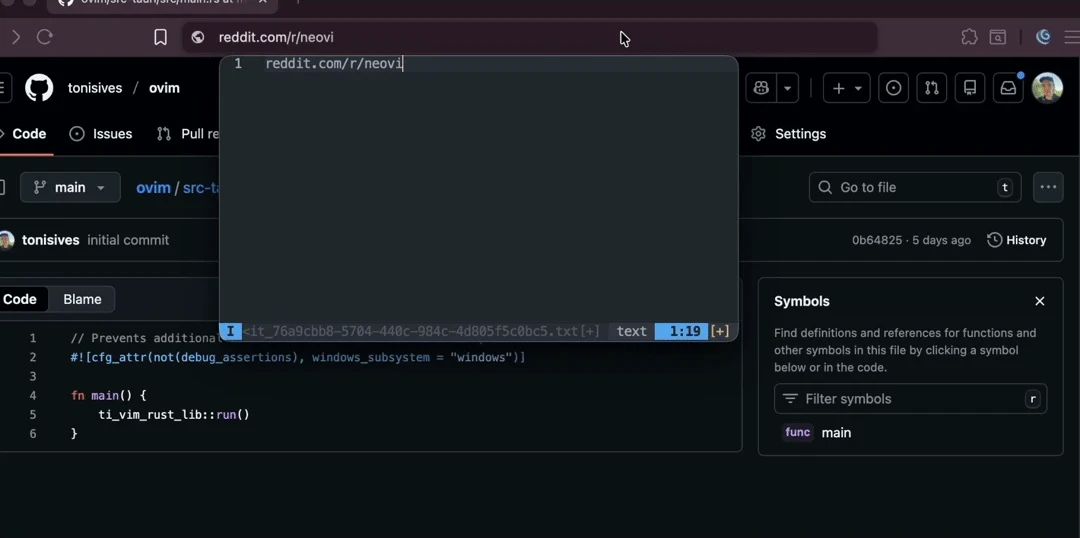
Open a browser text field containing a short draft. Focus the field and press your Edit Popup shortcut. The popup should open below it, while your regular terminal keeps its tile. Edit in Neovim, then save and exit with :wq to return the text.
- 1. Focus the fieldKeep the browser in its tile.
- 2. Edit in Neovimovim floats its popup near the field.
- 3. Save and return
:wqfinishes the edit.
Below the field is the preferred position. If it does not fit, ovim tries above the field or centers the popup. When the field bounds are unavailable, it can center the popup in the focused window. A centered popup does not by itself mean floating failed.
For a shorter edit, use In-Place Mode instead. It provides supported Vim motions in the text field without opening another window.
Optional: add an Ovim-only AeroSpace window rule
An integrated build does not need this rule. It is useful for older ovim builds or when you want AeroSpace to classify the editor at window creation. Add it to your existing AeroSpace configuration, ahead of any broader rule that tiles or moves Alacritty windows.
# Add this rule before broader Alacritty rules.
[[on-window-detected]]
if = 'test %{app-bundle-id} = org.alacritty && test %{window-title} ~= "^ovim-(edit|prewarm)-"'
run = 'layout floating'
check-further-callbacks = false
The rule matches Alacritty plus the ovim-edit- or ovim-prewarm- title prefix. It stops later callbacks from applying to that popup. Other Alacritty titles continue through your usual rules. AeroSpace describes this ordering in its callback guide.
Older AeroSpace configuration syntax
If your AeroSpace version rejects the test condition, use this equivalent legacy rule instead. Do not add both.
# For AeroSpace versions that do not support "test" conditions.
[[on-window-detected]]
if.app-id = 'org.alacritty'
if.window-title-regex-substring = '^ovim-(edit|prewarm)-'
run = 'layout floating'
check-further-callbacks = false
Merge the rule into your existing on-window-detected list. If your file uses the inline array form, add an equivalent entry there instead of declaring the list again. Reload the configuration, then reopen the popup:
aerospace reload-configA title rule can miss a window whose title is set after detection. The automatic integration retries discovery briefly and targets the resulting ID. See AeroSpace’s title-matching caveat.
Troubleshoot a popup that still gets tiled
With the popup open, inspect only Alacritty windows:
aerospace list-windows --monitor all --app-bundle-id org.alacritty \
  --format '%{window-id} %{window-title}'
Find the row whose title begins with ovim-edit- or ovim-prewarm- and use its numeric ID to test floating. Replace WINDOW_ID below with that ID:
aerospace layout --window-id WINDOW_ID floating- No response from AeroSpace: start AeroSpace and check that the CLI is installed. ovim searches standard Homebrew paths as well as PATH.
- The popup moves to another workspace: inspect broad Alacritty callbacks. Put the popup exception before rules that move normal terminals.
- Every Alacritty window floats: narrow your rule to the Ovim title prefixes.
- The shortcut does nothing: check permissions and conflicts with AeroSpace, macOS, or other hotkey tools.
- Neovim opens empty: text capture is a separate issue from window layout. Try a plain text field and inspect
/tmp/ovim-rust.log.
The targeted command is documented under AeroSpace layout. It tests floating; reopen the popup afterward so ovim can position it again.
Keep window navigation and text editing separate
AeroSpace bindings such as Alt+h/j/k/l can move between windows, while plain h/j/k/l work inside Vim Normal mode. Check your own mappings, especially custom Neovim Alt bindings. Use a separate shortcut for Edit Popup.
For a broader desktop setup, Andrew Williams’ Using Aerospace post describes his experience making exceptions for temporary windows. Here, the exception is specifically the editor attached to your text field.
You can keep AeroSpace’s tiled workspace and still edit a draft in your own Neovim. Enable popup positioning, use the Alacritty integration or the title rule, and keep the edit shortcut separate from your window controls. Continue with the Edit Popup guide or supported Vim keybindings.